WhatsApp Business App vs API: Costs, Limits and Which One You Need
 By Aniket Gupta, digital marketer & SEO expert
12 min read
Practical guidance from hands-on SEO, website and ads work for small businesses. Prices are my published rates; every other figure links to its source at the end.
You built a customer list on WhatsApp, sent a festive offer to 300 people, and half of them never got it. That isn’t bad luck. The free WhatsApp Business app only delivers broadcasts to people who have saved your number, and caps each list at 256 contacts. The paid API removes those walls but adds per-message costs, rules and a learning curve. This guide shows you exactly where the line is, with Meta’s current India rates, so you can pick the right one (or use both) without wasting a rupee.
Key takeaways
- The WhatsApp Business app is free and perfect for one owner or a small team replying by hand: up to 4 linked devices, a catalogue, labels and quick replies.
- Its limits bite when you grow: broadcast lists hold 256 contacts and only reach people who saved your number; there’s no real automation or CRM sync.
- The WhatsApp Business Platform (API) charges per delivered message. From 1 October 2026 in India: marketing ₹0.8631, utility and authentication ₹0.1150, and service replies are free for the first 1,000 a month per number.
- With Coexistence, you can keep the app on your phone and connect the same number to the API, so you don’t have to choose all at once.
- Switch to the API when broadcasts, bookings or lead follow-up start eating your day, not before.
The short answer: which one do you need?
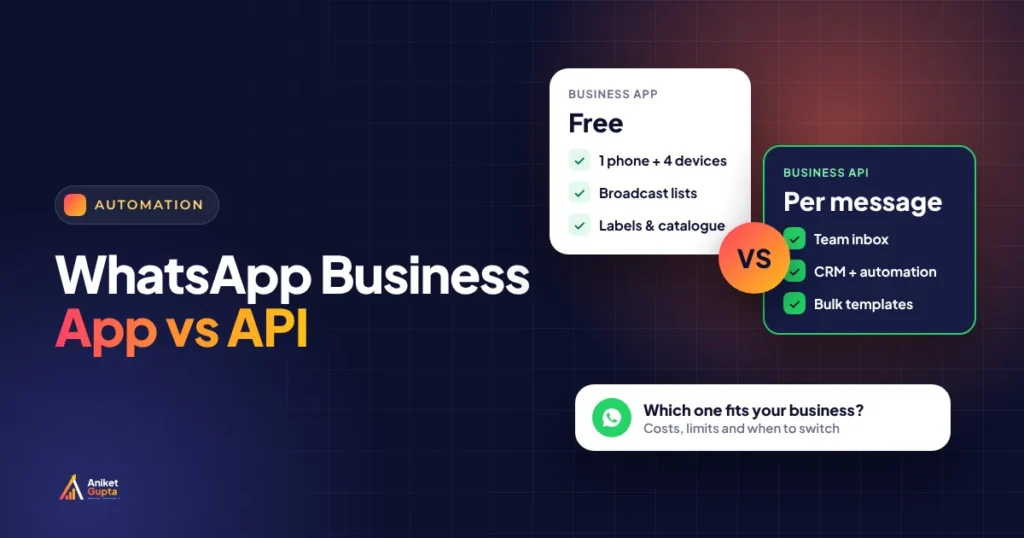
WhatsApp Business app
Best when you or one or two people answer chats by hand and your customer list is small.
- Free to download and use
- One phone plus up to 3 linked devices
- Catalogue, labels, quick replies, greeting and away messages
- Broadcasts to 256 saved contacts per list
WhatsApp Business Platform (API)
Best when you need to message many opted-in customers, automate replies or connect WhatsApp to your CRM.
- Unlimited agents through a shared inbox
- Approved templates to opted-in customers, saved or not
- Chatbots, flows, CRM and website integration
- Charged per delivered message by category
A quick rule from client set-ups: if most of your WhatsApp time goes on replying, the app is enough. If it goes on sending the same thing to many people, chasing leads, or sending booking and order updates, the API pays for itself. Many businesses in Delhi end up using both on the same number, which Meta now allows (see Coexistence below).
Business app vs API: side-by-side comparison
| WhatsApp Business app | WhatsApp Business Platform (API) | |
|---|---|---|
| Cost | Free | Per delivered message (Meta) plus any provider fee |
| Who uses it | One phone, up to 4 linked devices | Unlimited agents through an inbox tool |
| Bulk messages | Broadcast lists of up to 256 contacts; only people who saved your number receive them | Pre-approved templates to opted-in customers, whether or not they saved your number |
| Daily sending limit | Practical limits only (and spam reports) | Portfolio tiers starting at 250 business-initiated chats a day, scaling up automatically |
| Automation | Greeting, away messages and quick replies | Chatbots, flows, triggers from your website, CRM or store |
| Integrations | None | CRM, Shopify or WooCommerce, booking tools, Google Sheets |
| Catalogue | Up to 500 items | Product messages and catalogues via Commerce Manager |
| Verification | Paid Meta Verified badge available in India | Business verification and the official business account badge for eligible brands |
| Set-up time | 10 minutes | A few days (verification, number, templates) |
| Best for | Owner-led businesses, early stage | Clinics, coaching, real estate, D2C stores, anyone with volume |
The broadcast trap: on the free app, a broadcast only reaches people who added you to their phone contacts. If you collected numbers from walk-ins or ads, many of them never saved yours, so your offer silently goes nowhere. The API sends to anyone who has opted in, saved or not.
What the free Business app does well
Don’t underestimate the free app. For a salon, a tutor, a boutique or a consultant who answers personally, it covers most of what you need:
- Business profile: address, hours, website, email and a short description customers see when they tap your name.
- Catalogue: show products or services with prices and photos, so you stop sending the same pictures again and again.
- Labels: tag chats as “New lead”, “Paid”, “Follow up” and filter them. It’s a free mini-CRM.
- Quick replies: type “/price” and your standard reply appears.
- Greeting and away messages: answer instantly when you’re busy or closed.
- Linked devices: use WhatsApp Web or a second phone, up to four devices in total.
- Click-to-WhatsApp ads: run Facebook and Instagram ads that open a chat with you.
In India, small businesses can also pay for a Meta Verified subscription on the app. When it launched for WhatsApp Business in India in September 2024, TechCrunch reported plans from about ₹639 a month, with a verified badge and multi-device extras. Check the current price in the app before you buy.
Where the free app runs out of road
You can make several lists, but each send is manual, and you can’t personalise names or add buttons.
Only people who saved your number receive broadcasts. New leads from ads usually haven’t.
No chatbot, no follow-up sequence, no reminders triggered by a booking or an order.
Two people replying from the same number means duplicate or missed replies, and no record of who said what.
Leads live in one phone. If that phone is lost or the employee leaves, so does your history.
Unofficial “bulk sender” apps break WhatsApp’s terms and get numbers restricted. The API is the official route.
What the API adds (and what it costs you in effort)
The WhatsApp Business Platform (people still call it “the API”) is Meta’s official system for businesses that message at scale. You usually access it through a provider (a Business Solution Provider, or BSP) such as Interakt, Wati, AiSensy or Gupshup, or directly through Meta’s Cloud API if you have a developer.
- Templates: any message you start (an offer, a reminder, an order update) must use a template Meta has approved. Replies inside a 24-hour customer service window can be free-form.
- Opt-in: you must have the customer’s permission to message them on WhatsApp, and you should keep a record of it.
- Shared inbox: your whole team answers from one number, with chats assigned and tracked.
- Automation: chatbots, menus, WhatsApp Flows (forms inside the chat), and messages triggered by your website, CRM or store.
- Quality rating: if many people block or report you, your rating drops. Relevant, expected messages keep it healthy.
How API pricing works in India (October 2026)
Meta moved to per-message pricing (see Meta’s official pricing page) on 1 July 2025 and changed how service and utility messages are charged on 1 October 2026. You pay for each delivered template message, at a rate that depends on its category and the customer’s country. These are Meta’s list rates for Indian numbers:
| Message category | What it’s for | Meta rate per delivered message |
|---|---|---|
| Marketing | Offers, launches, festive greetings, re-engagement | ₹0.8631 |
| Utility | Order, delivery, booking and payment updates | ₹0.1150 |
| Authentication | One-time passwords (OTPs) | ₹0.1150 |
| Service | Free-form replies inside a 24-hour customer service window | First 1,000 a month per number free, then ₹0.1150 |
| Click-to-WhatsApp ad chats | Messages during the free entry point window after someone clicks your ad | Not charged |
Two things surprise most businesses. First, marketing messages cost about 7.5 times as much as utility messages, so a booking reminder is cheap but a promo blast isn’t. Second, providers usually add a small markup per message. InstantDM’s October 2026 comparison lists display rates such as AiSensy at ₹1.09 and Interakt at ₹0.871 per marketing message, and 18% GST applies to the provider’s invoice. Always compare the per-message rate and the monthly plan fee.
Estimate your monthly WhatsApp API bill
Enter your expected monthly volumes. Meta’s India rates from 1 October 2026 are built in, and the totals update as you type.
Meta list rates per delivered message: marketing ₹0.8631, utility ₹0.1150, service ₹0.1150 after 1,000 free a month per number. Providers often add a small markup per message, and 18% GST applies to their invoice. Messages inside a click-to-WhatsApp free entry point window aren’t charged. An estimate, not a quote.
Messaging limits: how many people can you reach a day?
The API controls how many new conversations you can start in 24 hours. Since 7 October 2025, Meta sets this limit per business portfolio, shared by all your numbers, rather than per phone number (Meta’s messaging limits documentation).
- Start at 250 New portfolios can message 250 unique customers a day outside an open chat. Replies to customers who message you first don’t count.
- Use half your limit with good quality Meta raises the limit automatically when you use at least half of it within seven days and your messages aren’t being blocked or reported.
- Climb the tiers Limits step up to 2,000, 10,000, 100,000 and then unlimited. Since October 2025, increases apply within about six hours.
- Protect your quality rating Send relevant messages to people who opted in, at sensible times. A burst of blocks is the fastest way to lose reach.
Coexistence: keep the app and add the API on the same number
Until 2025, moving a number to the API meant deleting it from the Business app. Coexistence, which launched in beta in February 2025 and became globally available from May 2025, lets you connect your existing Business app number to the Cloud API and keep using the app on your phone.
- Up to six months of chat history can sync, and new one-to-one chats mirror between the app and your API inbox.
- Your broadcast lists become read-only, because bulk sending moves to API templates.
- Groups, disappearing messages, view-once and live location don’t sync, and voice and video calls aren’t supported on the Cloud API.
- The app stays free; messages sent through the API are charged at the normal rates.
Good fit: the owner keeps chatting personally from the app, while booking reminders, order updates and campaigns run automatically through the API on the same number customers already know.
Which one fits your business?
| Business | Start with | Why |
|---|---|---|
| Solo consultant, tutor, boutique | Business app | Personal replies matter most and volumes are small |
| Clinic or diagnostic centre | API (or Coexistence) | Appointment reminders and reports are cheap utility messages that cut no-shows |
| Coaching institute | API | Admissions follow-up and batch updates to hundreds of parents and students |
| Real estate | API | Leads from ads need instant replies, brochures and follow-up sequences |
| D2C or Shopify store | API | Order, shipping and COD-confirmation messages plus abandoned-cart recovery |
| Restaurant or café | Business app, then API | Start with the catalogue; move to the API for offers to a large list |
Signs it’s time to move to the API
- You make several broadcast lists every week and still miss people.
- More than one person replies from the same number, and chats get missed or doubled.
- You send the same booking, order or payment updates by hand every day.
- Leads from ads wait hours for a reply, and some are never followed up.
- You want WhatsApp leads in your CRM or Google Sheet automatically.
- You’ve been tempted by an unofficial bulk-sender tool. Don’t; it puts your number at risk.
How to move to the API without losing customers
- Choose your route A provider (fastest, with an inbox and templates) or Meta’s Cloud API directly (cheapest, needs a developer). Decide whether you want Coexistence or a fresh number.
- Verify your business Complete business verification in Meta Business Manager with your GST or registration documents and a matching website.
- Collect opt-in properly Add a WhatsApp checkbox or clear wording to your website forms, booking flow and checkout. Keep a record of consent.
- Write and submit templates Start with utility templates (booking confirmed, order shipped), then two or three marketing templates. Avoid all-caps and vague promos, which get rejected.
- Connect your systems Link your website form, CRM or store so messages trigger themselves, and route new chats to the right person.
- Start small and watch quality Message your most engaged customers first, track blocks and replies, and grow your sending tier gradually.
Want the API set up properly the first time?
I set up the WhatsApp Business Platform with verification, templates, opt-in and CRM connection, from ₹9,999 plus GST, and can run monthly campaigns from ₹7,999.
Mistakes that cost businesses money (or their number)
- Sending marketing templates for everything. Utility messages are far cheaper. A booking confirmation shouldn’t be classed as marketing.
- Messaging people who never opted in. It hurts your quality rating and can break India’s data protection rules as they phase in through 2027.
- Buying contact lists. Purchased numbers block and report you.
- Ignoring replies. Every campaign creates conversations. Plan who answers them, or the campaign wastes the money it cost.
- Forgetting the free windows. Replies within an open 24-hour chat are free up to 1,000 a month per number, and click-to-WhatsApp ad chats open a free entry point window.
Related guides
FAQs
Is the WhatsApp Business app free?
Yes. The app is free to download and use, including the catalogue, labels, quick replies and broadcast lists. Optional extras such as a Meta Verified subscription are paid.
How many people can I broadcast to on the Business app?
Up to 256 contacts per broadcast list, and only people who have saved your number in their phone contacts will receive the message.
How much does the WhatsApp Business API cost in India?
Meta charges per delivered message. From 1 October 2026 the India rates are ₹0.8631 for marketing and ₹0.1150 for utility and authentication messages; service replies are free for the first 1,000 a month per number, then ₹0.1150. Providers may add a markup and a monthly plan fee, plus 18% GST on their invoice.
Can I use the Business app and the API on the same number?
Yes, through Coexistence. You connect your existing app number to the Cloud API and keep the app on your phone. Broadcast lists become read-only and some features such as groups don’t sync.
Do I need a website to get the API?
You need to complete Meta business verification, and a website that matches your business details makes that much easier. Most providers will ask for it.
Can my number get banned on the API?
The official API is the approved way to message at scale, but your quality rating still drops if people block or report your messages. Message only people who opted in, with relevant content.
Is the green tick available to small businesses?
The official business account badge on the API depends on Meta’s eligibility checks. On the Business app in India, small businesses can subscribe to Meta Verified for a verified badge.
Should I go directly with Meta’s Cloud API or use a provider?
Direct is cheapest if you have a developer to build the inbox and integrations. A provider costs more per message or per month but gives you a ready inbox, template tools and support.
Sources
- WhatsApp Help Center: How to use broadcast lists
- Meta for Developers: Pricing on the WhatsApp Business Platform
- InstantDM: WhatsApp Business API pricing 2026, India rates and October changes
- Meta for Developers: Messaging limits changes (October 2025)
- Chakra: WhatsApp Coexistence, what has changed since launch
- Infobip: WhatsApp Business App vs WhatsApp Business Platform (July 2026)
- TechCrunch: WhatsApp brings Meta Verified to small businesses in India (Sept 2024)