Google Business Profile Optimisation: The Checklist I Use for Clients (2026)
 By Aniket Gupta, digital marketer & SEO expert
11 min read
Practical guidance from hands-on SEO, website and ads work for small businesses. Prices are my published rates; every other figure links to its source at the end.
When someone searches “dentist near me” or “CA in Laxmi Nagar”, most people pick from the three businesses in the map pack without ever opening a website. That makes your Google Business Profile the cheapest local marketing you will ever do. This is the checklist I work through for local SEO clients, the results it has produced, and the weekly routine I hand over so the profile keeps working.
Key takeaways
- Google ranks local results on relevance, distance and prominence. You can’t pay for a better local ranking, but you can improve relevance and prominence.
- Your primary category is the strongest single profile setting in Whitespark’s 2026 survey of local SEO practitioners. Choose it carefully.
- Google says customers are 2.7 times more likely to see a business as reputable when its profile is complete.
- 74% of consumers look for reviews from the last three months (BrightLocal 2026), so a steady flow of new reviews beats a one-off push.
- Q&A is now limited to select categories and regions, and many profiles no longer show it. AI answers in Maps draw on your reviews, profile details and website, so keep all three complete.
What this checklist has done for my clients
Before the steps, here is what they produced. Both profile examples are from 2024 and are compared with the same months a year earlier, so seasonality is taken out.
| Client | Period | Profile interactions | Change |
|---|---|---|---|
| Smart Babysitters, Dubai | May–Sep 2024 | 3,816 | +20.2% |
| VitalZone, UAE | Jun–Aug 2024 | 2,077 | +24.7% |
- Smart Babysitters, Dubai: profile interactions up 20.2% from May to September 2024. Read the case study.
- VitalZone, UAE: profile interactions up 24.7% from June to August 2024.
- Explore Watersports, Goa: local SEO that took the site from 10–15 Google clicks a day to more than 110 over three months in late 2023. Read the case study.
Interactions are the calls, bookings, direction requests and website clicks recorded in each client’s Business Profile Performance report. The screenshots are on my results page.
The basics, briefly
Google ranks local results on three things: relevance, distance and prominence. You cannot pay for a better position, and you cannot move your address, so the work goes into relevance (categories, services, a clear description and matching service pages) and prominence (reviews, photos, posts and mentions on other sites). Google also says a complete profile makes customers 2.7 times more likely to see you as reputable.
If you are setting up a profile for the first time and want the full beginner’s walkthrough, including who is eligible and how verification works, read the Google Business Profile guide on TechVendorly, a publication I co-founded. The checklist below is the hands-on version I use with clients.
The 12-step optimisation checklist
1. Claim and verify your profile
Search for your business on Google Maps. If a profile exists, claim it; if not, create one at business.google.com. Verification confirms you’re allowed to manage it, and Google notes that verified businesses are more likely to show in local results. Verification is often by video: keep your signboard, premises and proof of business (such as GST or shop registration) ready.
2. Choose the right primary category
Pick the most specific category for your main service, then add secondary categories for other genuine services. Check which categories the top three businesses in the map pack use for your main search.
| Business | Too broad | Better primary category |
|---|---|---|
| Children’s doctor | Doctor | Pediatrician |
| Dental clinic | Doctor | Dentist |
| GST and tax filing practice | Consultant | Chartered accountant |
| Men’s haircuts | Beauty salon | Barber shop |
| AC repair and servicing | Repair service | Air conditioning repair service |
3. Use your real business name
Practitioners rate keywords in the business name as a strong ranking signal, which is exactly why so many businesses stuff them in. Google’s guidelines say your name must match your real-world branding, and keyword-stuffed names can lead to suspension. If you want a keyword in your name, it has to be on your signboard, invoices and website too.
4. Complete every field
- Address and map pin exactly as on your signboard and website. Service-area businesses can hide the address and list areas instead.
- Hours and special hours: being open at the time of the search is a ranking factor, so update Diwali, Holi and other holiday hours.
- Phone and website: a local number, linked to the most relevant page, not always the homepage.
- Services and products: each with a short description and a price where it makes sense.
- Attributes: wheelchair access, women-led, online appointments and other details.
- Description: up to 750 characters on what you do, who you serve and why people choose you.
A description formula that works: what you do and where (one sentence), who you help and what makes you different (one or two sentences), your main services in plain words, and how to book. Write for customers, not keywords.
Customers come to you
Clinics, shops, salons, offices.
- Show your full address
- Accurate map pin and entrance photos
- Opening hours matter for ranking
You go to customers
Plumbers, AC repair, home tutors, cleaners.
- Hide the address, list the areas you serve
- You’ll rank best near your verified address
- Add a service page per main area on your website
5. Add real photos and videos
Upload your logo, a cover image, the outside of your premises (so people can find you), the inside, your team and your work. Add new photos every month. Real photos build trust far better than stock images, and Google lists photos among its own tips for improving local ranking.
6. Build a steady flow of reviews
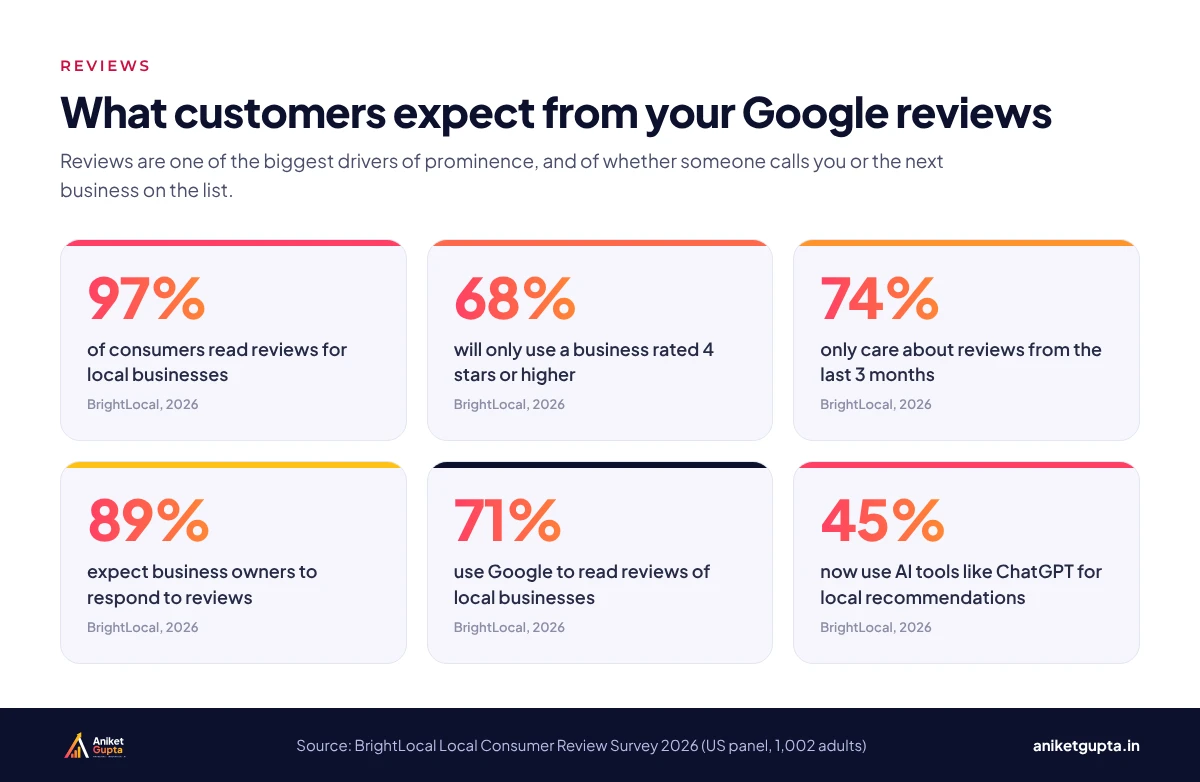
Reviews feed prominence, and they decide whether a searcher calls you or the next business on the list.
- Ask every genuine customer soon after you’ve delivered, with a short link or a QR code at the counter, and never pressure anyone to review on the spot.
- Don’t ask only the happy ones: Google’s policies don’t allow selectively asking for positive reviews.
- Aim for a steady pace every month, not a burst once a year.
- Let customers write in their own words. Google’s policies don’t allow asking for specific content in a review.
- Never buy reviews, offer rewards for them or gate them. All three break Google’s policies.
A neutral WhatsApp review request you can copy: “Hi Priya, thank you for visiting us today. We’d value your honest feedback on Google, whatever your experience was. It helps us improve and helps other patients choose: [your review link]. Thank you!” Send the same message to every customer, not only the ones you expect to be happy.
7. Reply to every review
Thank positive reviewers by name and mention the service they used. For negative reviews, apologise, keep it short and take the conversation offline. Future customers read your replies as much as the reviews, and BrightLocal found half of consumers are put off by generic, templated replies.
8. Post updates and offers
Posts let you share offers, events and updates. They keep the profile active and give searchers a reason to choose you today. One or two posts a week, with a real photo and a clear button such as Call now or Book, is enough for most businesses.
9. Prepare for AI answers in Google Maps
Google’s Business Profile Help now says Q&A is “available only for select business categories and regions” and that its appearance and functionality might change, and many profiles no longer show the section. Check whether your own profile still has it. Where it doesn’t, an AI-powered “Ask” feature in the Google Maps app answers questions about a place using what it can find: your reviews, profile details such as attributes, menus and photos, and your website. Whitespark’s advice is to “feed the sources” the AI draws on:
- Fill in every attribute and keep hours, menus and services current.
- Publish a clear FAQ on your website covering prices, parking, payment options, timings and booking.
- Encourage honest, detailed reviews and photos, without telling customers what to write.
- Link your website and social profiles so details match everywhere.
10. Match your website to your profile
Your website does a lot of the work behind the map pack. In Whitespark’s 2026 survey, the top local organic factor is a dedicated page for each service, followed by city or neighbourhood relevance in your content. Keep your name, address and phone number identical everywhere, add LocalBusiness schema, and link the profile to the page that best matches your primary category. See what makes a website generate leads.
11. Keep citations consistent
List your business with the same name, address and phone on the directories your customers use, such as JustDial, Sulekha, IndiaMART, Practo for clinics and your industry association. Fix old listings with an outdated phone number or address first.
12. Track calls, directions and website clicks
The Performance section shows searches, calls, direction requests, bookings and website clicks. Add UTM tags to your website link (for example ?utm_source=google&utm_medium=organic&utm_campaign=gbp) so visits from the profile show separately in Google Analytics 4, and review the numbers monthly.
A weekly and monthly routine
| When | Task | Time |
|---|---|---|
| Every week | Reply to new reviews; publish 1–2 posts | 15–20 min |
| Every week | Send review requests to recent customers | 10 min |
| Every month | Upload 5–10 new photos; check hours and special hours | 20 min |
| Every month | Review Performance: calls, directions, website clicks | 15 min |
| Every quarter | Check categories and services against top competitors | 30 min |
Review requests are easier to keep flowing when they’re automatic. My marketing automation guide shows a simple review-request workflow.
How to avoid a suspension
“Best Dentist Laxmi Nagar Dr Sharma Clinic” when the signboard says “Sharma Dental”.
Co-working desks or addresses where you don’t serve customers in person.
Two profiles for the same business at the same address.
Bought, incentivised or gated reviews can be removed and penalised.
Changing name, address and category all at once can trigger re-verification.
Correct the issue, gather proof (signboard photos, registration documents) and appeal through Google’s Business Profile reinstatement form.
Mistakes that hold profiles back
- The wrong primary category, often a broad one chosen when the profile was created.
- Different phone numbers or addresses on the website, directories and profile.
- Unanswered reviews, especially negative ones.
- Linking every profile to the homepage instead of the most relevant page.
- Stock photos, or no photos added since the profile was created.
- Holiday hours that were never updated, so customers arrive to a closed shutter.
A 30-day plan for a new or neglected profile
- Week 1: foundations Claim and verify; set primary and secondary categories; correct name, address, phone, hours and website link.
- Week 2: completeness Add services with descriptions, attributes and a 750-character description; upload 10+ real photos.
- Week 3: reviews Send review requests to recent customers; reply to every existing review.
- Week 4: consistency and tracking Fix your details on your website and top directories; add UTM tags; check Performance.
Want this done for your business?
My Local SEO plan covers Google Business Profile management, reviews, local citations and on-page SEO for one location, from ₹9,999 a month plus GST.
Related guides
FAQs
How long does it take for profile changes to affect rankings?
Simple fixes such as categories, hours and services can show movement within a few weeks. Competitive searches take longer, because prominence (reviews, links and mentions) builds over months.
Is Google Business Profile free?
Yes. Creating, verifying and managing a profile is free. Paid tools and consultants only help you manage it more efficiently.
Can I rank in the map pack without a physical address?
Yes. Service-area businesses can hide their address and list the areas they serve. You’ll usually rank best near the address you verified.
How many reviews do I need?
There’s no magic number. Aim for more recent reviews than the competitors in the map pack, a rating of 4 stars or higher, and a steady flow every month.
Should I respond to every review, including 5-star ones?
Yes. BrightLocal found 80% of consumers are more likely to use a business that replies to all its reviews. Keep replies personal, not templated.
Can I add keywords to my business name?
Only if they’re part of your real business name, used on your signboard, website and documents. Adding keywords just for ranking breaks Google’s guidelines and can get the profile suspended.
What happened to Questions and Answers?
Google says Q&A is now available only for select business categories and regions, and many profiles no longer show it. Where it’s missing, an AI “Ask” feature in the Maps app answers questions using your reviews, profile details and website, so keep those complete and add an FAQ to your site.
Do posts help ranking?
Google doesn’t list posts as a ranking factor. Their value is that they keep the profile current and give searchers a reason to call, visit or book.
Can you manage my profile for me?
Yes. It’s part of my Local SEO plan, which covers profile management, posts, review strategy, citations and monthly reporting for one location.
Sources
- Google Business Profile Help: Tips to improve your local ranking on Google
- Google Business Profile Help: Complete your Business Profile
- Google Business Profile Help: Guidelines for representing your business
- BrightLocal: Local Consumer Review Survey 2026
- PinMeTo: BrightLocal Local Consumer Review Survey 2026 summary
- Whitespark: Local Search Ranking Factors 2026
- Google Business Profile Help: Edit your Business Profile (Q&A availability)
- Google Maps: Prohibited and restricted content (review solicitation)
- Whitespark: With Google Q&A gone, you need a Maps “Ask a question” strategy