Google Business Profile Optimisation: The 2026 Local SEO Checklist for Small Businesses
 Aniket Gupta
9 min read
Key takeaways
- Google ranks local results on relevance, distance and prominence. You can’t pay for a better local ranking, but you can improve relevance and prominence.
- Your primary category is the strongest single profile setting in Whitespark’s 2026 ranking factors study. Choose it carefully.
- Google says customers are 2.7 times more likely to see a business as reputable when its profile is complete.
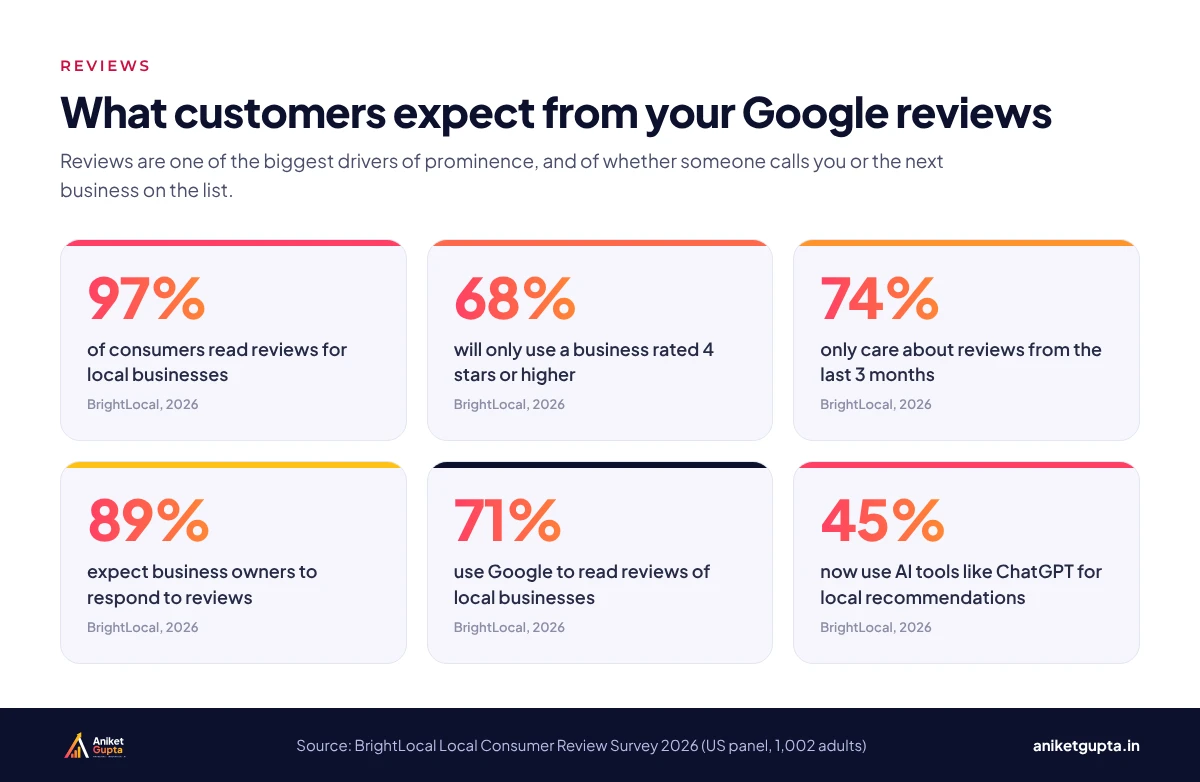
- 97% of consumers read reviews and 74% only care about the last three months, so a steady flow of new reviews beats a one-off push.
- Link your profile to a dedicated website page for each service, the top local organic factor in the same study.
In this guide
For most local businesses, the Google Business Profile is the first thing a customer sees, before the website, before Instagram and often before a phone call. It decides whether you appear in the map pack for searches like clinic near me or best barbershop in Al Bateen, and what people see when they find you.
This checklist covers what Google itself says about local ranking, what the latest independent research shows, and the routine I follow for clients. You can work through it in an afternoon and then keep it up in about 30 minutes a week.
Why your Google Business Profile matters
Google publishes its own figures on complete profiles. According to its Business Profile Help Centre, customers are 2.7 times more likely to consider a business reputable if they find a complete Business Profile on Search and Maps, 70% more likely to visit and 50% more likely to consider purchasing from it.
Search behaviour is also changing. BrightLocal’s 2026 survey found that 45% of consumers now use AI tools such as ChatGPT for local recommendations, up from 6% a year earlier. Those tools lean heavily on the same public signals that Google uses: reviews, categories, consistent business details and your website. A well-kept profile helps you in both places.
| What a complete profile does | Figure | Source |
|---|---|---|
| Seen as reputable | 2.7× more likely | |
| Customers visit | 70% more likely | |
| Customers consider buying | 50% more likely | |
| Consumers using AI for local recommendations | 45% | BrightLocal 2026 |
How Google ranks local businesses
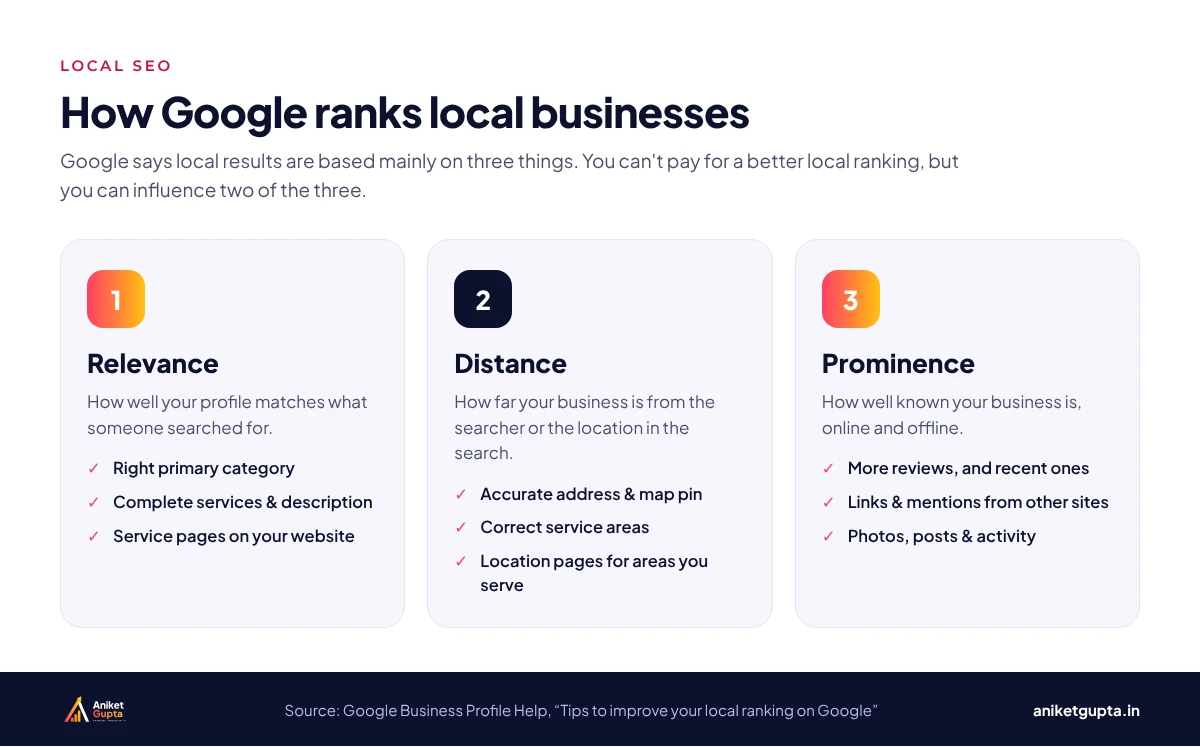
Google says local results are based mainly on three factors, and it states plainly that there is no way to request or pay for a better local ranking.
| Factor | What Google means | What you can do |
|---|---|---|
| Relevance | How well your profile matches what someone searched for | Choose accurate categories, list every service, write a clear description and build service pages on your website |
| Distance | How far you are from the searcher or the place they searched for | Keep your address and map pin accurate; you can’t move your business, but you can be precise |
| Prominence | How well known your business is | Earn more and newer reviews, get mentioned and linked by other sites, stay active with photos and posts |
Independent research agrees. In Whitespark’s 2026 Local Search Ranking Factors study, the top-rated factors for the map pack are the primary GBP category, proximity to the searcher, keywords in the business name, a physical address in the city of the search, being open at the time of the search and a high Google rating.
The 10-step optimisation checklist
1. Claim and verify your profile
Search for your business on Google Maps. If a profile already exists, claim it; if not, create one at business.google.com. Verification confirms you are allowed to manage it, and Google notes that verified businesses are more likely to show in local results.
2. Choose the right primary category
Pick the most specific category that describes your main service, such as Pediatrician rather than Doctor, or Barber shop rather than Beauty salon. Then add secondary categories for other genuine services. Look at the top three competitors in the map pack for your main search to see which categories they use.
3. Use your real business name
Keywords in the business name are a strong ranking signal, which is exactly why many businesses stuff them in. Google’s guidelines say your name should match your real-world branding, and keyword-stuffed names can lead to suspension. If you want a keyword in your name, it has to be on your signboard, invoices and website too.
4. Complete every field
- Address and map pin: exactly as on your signboard and website. Service-area businesses can hide the address and list areas instead.
- Hours and special hours: being open at the time of the search is a ranking factor, so keep holiday hours up to date.
- Phone and website: use a local number and link to the most relevant page, not always the homepage.
- Services and products: list each one with a short description and price where it makes sense.
- Attributes: wheelchair access, women-led, online appointments and other details that help people choose.
- Description: up to 750 characters on what you do, who you serve and why people choose you. Write it for customers, not for keywords.
5. Add real photos and videos
Upload your logo, a cover image, the outside of your premises (so people can find you), the inside, your team and your work. Add new photos every month. Real photos build trust far better than stock images, and Google lists photos among its own tips for improving local ranking.
6. Build a steady flow of reviews
Reviews feed prominence, and they decide whether a searcher calls you or the next business on the list. BrightLocal’s 2026 survey shows how high expectations now are.
- Ask every happy customer, at the moment they are happiest, with a short link or QR code.
- Aim for a steady pace. 74% of consumers only care about reviews from the last three months.
- Never buy reviews, offer rewards for them or gate them. All three break Google’s policies.
7. Reply to every review
89% of consumers expect owners to respond, and 81% expect a reply within a week. Thank positive reviewers by name and mention the service they used. For negative reviews, apologise, keep it short and take the conversation offline. Future customers read your replies as much as the reviews.
8. Post updates and offers
Google Business Profile posts let you share offers, events and updates. They keep the profile active and give searchers a reason to choose you today. One or two posts a week, with a photo and a clear button such as Call now or Book, is enough for most businesses.
9. Match your website to your profile
Your website does a lot of the work behind the map pack. In Whitespark’s 2026 study, the top local organic factor is a dedicated page for each service, followed by city or neighbourhood relevance in your content. Make sure your name, address and phone number match your profile exactly, add LocalBusiness schema, and link the profile to the page that best matches your primary category.
10. Track calls, directions and website clicks
Your profile’s Performance section shows searches, calls, direction requests, bookings and website clicks. Add UTM tags to your website link so visits from the profile show up separately in Google Analytics 4, and review the numbers monthly.
A weekly and monthly routine
| When | Task | Time |
|---|---|---|
| Every week | Reply to new reviews and questions; publish 1–2 posts | 15–20 min |
| Every week | Send review requests to recent customers | 10 min |
| Every month | Upload 5–10 new photos; check hours and special hours | 20 min |
| Every month | Review Performance: calls, directions, website clicks | 15 min |
| Every quarter | Check categories and services against top competitors | 30 min |
Mistakes that hold profiles back
- The wrong primary category, often a broad one chosen when the profile was first created.
- Keyword-stuffed business names that don’t match the real signboard and risk suspension.
- Different phone numbers or addresses on the website, directories and the profile.
- Unanswered reviews, especially negative ones left without a reply.
- Bought or incentivised reviews, which can be removed and can lead to penalties.
- Linking every profile to the homepage instead of the most relevant service or location page.
Real results from two client profiles
This is the same process I use for local SEO clients. Two examples from 2024, each compared with the same months a year earlier:
| Client | Period | Business Profile interactions | Change |
|---|---|---|---|
| Smart Babysitters, Dubai | May–Sep 2024 | 3,816 | +20.2% |
| VitalZone, UAE | Jun–Aug 2024 | 2,077 | +24.7% |
You can see both screenshots, along with Search Console results, on my results page.
Want this done for your business?
My Local SEO plan covers Google Business Profile management, reviews, local citations and on-page SEO for one location, from ₹9,999 a month plus GST.
FAQs
How long does it take for Google Business Profile changes to affect rankings?
Simple fixes such as categories, hours and services can show movement within a few weeks. Competitive searches take longer, because prominence (reviews, links and mentions) builds over months.
Is Google Business Profile free?
Yes. Creating, verifying and managing a Google Business Profile is free. Paid tools and agencies only help you manage it more efficiently.
Can I rank in the map pack without a physical address?
Yes. Service-area businesses can hide their address and list the areas they serve. You will usually rank best near the address you verified, so be realistic about distant areas.
How many reviews do I need?
There is no magic number. What matters is having more recent reviews than the competitors you see in the map pack, and a rating of 4 stars or higher, which 68% of consumers expect.
Should I respond to every review, including the 5-star ones?
Yes. 89% of consumers expect owners to respond. Short, personal replies to positive reviews show you value customers; calm replies to negative ones show future customers how you handle problems.
Can I add keywords to my business name?
Only if they are part of your real business name, used on your signboard, website and documents. Adding keywords just for ranking breaks Google’s guidelines and can get the profile suspended.
Do Google Business Profile posts help ranking?
Posts are mainly a conversion tool: they give searchers a reason to choose you now. They also keep the profile active and up to date, which supports the engagement signals Google uses.
Can you manage my Google Business Profile for me?
Yes. It’s part of my Local SEO plan, which covers profile management, posts, review strategy, citations and monthly reporting for one location.